Best HTML Email Templates for Ecommerce Campaigns

Ecommerce email marketing works best when every message feels clear, polished, and easy to act on. A welcome email should build trust. A product launch email should create interest. An abandoned cart email should recover lost revenue. A confirmation email should reassure the buyer. But creating each campaign from scratch takes time, and poorly coded templates can break across inboxes.
Ecommerce email marketing works best when every message feels clear, polished, and easy to act on. A welcome email should build trust. A product launch email should create interest. An abandoned cart email should recover lost revenue. A confirmation email should reassure the buyer. But creating each campaign from scratch takes time, and poorly coded templates can break across inboxes.
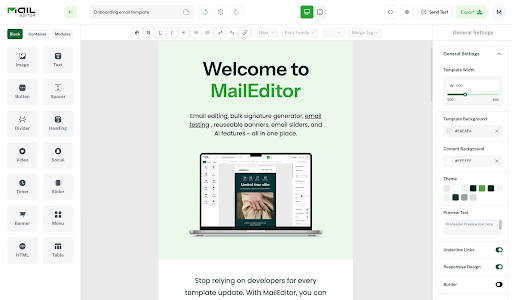
That is why ecommerce brands need professional HTML Email Templates that are responsive, editable, and easy to export. MailEditor helps ecommerce teams create mobile-ready emails faster with drag-and-drop editing, reusable blocks, branded presets, responsive columns, countdown timers, CTA buttons, and clean HTML export. Its template library covers newsletters, promotions, ecommerce, onboarding, transactional messages, retention emails, and more.
In this guide, we will cover the most useful Ecommerce Email Templates, when to use them, and how to customize each one for better engagement, clicks, and repeat purchases.
Why Ecommerce Brands Need Professional Email Templates
Ecommerce stores send many types of emails: promotional campaigns, automated flows, customer support messages, receipts, shipping alerts, and reactivation emails. Each email has a different job, but all of them should feel consistent with your brand.
A professional template helps your team save time, keep branding consistent, reduce design mistakes, improve mobile readability, and move campaigns from idea to launch faster. MailEditor templates are built to be customized visually, so teams can update text, colors, images, logos, buttons, spacing, and layout sections without rewriting code.
1. Welcome Email Template

A welcome email is usually the first message a new subscriber receives from your store. It introduces your brand, sets expectations, and gives the customer a reason to click right away.
A strong welcome template should include a friendly headline, a short brand introduction, a clear offer, and one focused CTA. Many ecommerce brands use this email to promote a first-purchase discount, show best-selling products, or invite subscribers to explore a collection.
Keep it simple. New subscribers do not need your full brand story in the first email. They need to know who you are, what you sell, and why they should click. MailEditor’s welcome email templates are designed to help brands create polished welcome emails that work across desktop and mobile.
2. Product Launch Email Template

When you release a new product, your email needs to create interest quickly. A product launch template should place the product image at the center, followed by a benefit-focused headline, short supporting copy, and a clear “Shop Now” or “Explore New Arrival” button.
This template works well for fashion, beauty, electronics, home decor, fitness, food, subscription boxes, and seasonal collections. MailEditor’s product promotion templates support product launch emails, product announcements, new arrivals, featured product campaigns, limited-time offers, bundles, recommendations, flash sales, review prompts, referrals, and follow-ups.
3. Promotional Sale Email Template

Sale emails are common in ecommerce, but they need a clean structure to convert. A strong promotional template should make the offer obvious, create urgency, and guide the reader toward one action.
Use this template for coupon emails, flash sales, clearance events, loyalty rewards, welcome offers, referral discounts, and seasonal discounts. Your email should include the discount, deadline, product section, and CTA button. Avoid adding too many products because too many choices can weaken the buying decision.
MailEditor’s discount templates are built for coupon emails, promo code messages, flash sales, seasonal offers, abandoned cart discounts, welcome offers, loyalty rewards, referral discounts, clearance sales, and product promotions.
4. Abandoned Cart Email Template

Abandoned cart emails target shoppers who already showed purchase intent. The goal is not to resell the entire product. The goal is to remind customers what they left behind and make it easy to complete checkout.
A good abandoned cart template should include the product image, product name, price, checkout button, and a short reminder message. You can also add urgency or a small incentive if it fits your brand.
MailEditor’s pending order template is useful for ecommerce platforms that want to recover incomplete transactions and guide customers toward finishing payment. It can be used for abandoned checkout recovery emails and pending payment reminders.
5. Back-in-Stock Email Template

Back-in-stock emails work because they respond to existing demand. If a customer wanted an item but could not buy it earlier, this email gives them a reason to act quickly.
The template should clearly announce that the product is available again, show the product image, and link directly to the product page. If stock is limited, mention it honestly without sounding pushy.
MailEditor’s product promotion template category can support back-in-stock alerts, new arrival emails, featured products, product recommendations, and limited-time offers, making it a flexible choice for ecommerce stores with changing inventory.
6. Order Confirmation Email Template

Order confirmation emails are transactional, but they still shape the customer experience. A clean confirmation template reassures buyers that their order was received and gives them the details they need.
Include the order number, purchased items, shipping address, payment summary, support contact, and tracking CTA if available. MailEditor’s order confirmation templates are built for purchase confirmations, receipts, payment details, shipping addresses, delivery estimates, pickup details, digital access links, subscriptions, review requests, referrals, and follow-ups.
7. Shipping Confirmation Email Template

Shipping confirmation emails reduce customer anxiety. Buyers want to know where their order is and when it will arrive.
A good shipping email template should include the tracking link, estimated delivery date, shipping carrier, order summary, and support details. The CTA should be direct, such as “Track Your Order.”
MailEditor’s order shipped ecommerce email template is designed to notify customers when an order has been dispatched, provide delivery details, and improve the post-purchase experience. It is mobile friendly, customizable, and exportable as clean HTML for ecommerce platforms.
8. Review Request Email Template

Customer reviews build trust and help future shoppers make buying decisions. A review request email should be short, polite, and easy to complete.
The template should thank the customer, mention the product they purchased, and include one button to leave a review. Avoid asking for too much at once. A clean layout with one direct CTA usually works better than a long message.
MailEditor’s notification email templates can be adapted for order updates, shipping notifications, support notices, review requests, referral prompts, and follow-ups.
9. Customer Win-Back Email Template

A win-back email is designed for customers who have not purchased in a while. The goal is to remind them why they liked your brand and give them a reason to return.
This template can include a personalized message, a special offer, new arrivals, product recommendations, or best sellers. The tone should feel warm, not desperate. “We saved something special for you” is more inviting than “Why haven’t you ordered?”
MailEditor’s reactivation email templates help ecommerce brands send win-back campaigns, dormant subscriber messages, comeback offers, preference updates, renewal nudges, and follow-ups.
10. Seasonal Campaign Email Template

Seasonal campaigns work because they match moments when customers are already ready to shop. Black Friday, Cyber Monday, Christmas, Valentine’s Day, summer sales, back-to-school campaigns, and holiday gift guides all benefit from dedicated seasonal templates.
A seasonal template should include a strong visual theme, clear promotional copy, product sections, deadline reminders, and a bold CTA. MailEditor’s holiday email templates help ecommerce brands send holiday greetings, seasonal newsletters, gift guides, sale announcements, deadline reminders, event invitations, thank-you emails, feedback requests, and follow-ups.
Where Email Signature Generators Fit In
Ecommerce brands often focus on campaign emails but forget everyday communication. Support replies, partnership emails, order help messages, wholesale conversations, and founder outreach also shape how customers see your brand.
That is where Email Signature Generators help. A professional email signature can include your logo, store URL, social links, support details, and even a small promotional banner. MailEditor’s signature generator lets users create customizable signatures for individuals or teams and generate multiple signatures at once.
For ecommerce businesses, branded signatures are useful for customer support teams, sales teams, founders, partnership managers, and operations staff. They make normal business emails look more polished while subtly sending traffic back to your store.
Final Thoughts
The best ecommerce emails are clear, responsive, and easy to act on. Whether you are welcoming a new subscriber, launching a product, recovering an abandoned cart, confirming an order, or sending a seasonal offer, the right template helps your team move faster and communicate more professionally.
MailEditor makes this process easier with ready-to-edit HTML Email Templates, visual customization, reusable blocks, clean HTML export, and template categories for promotions, ecommerce, onboarding, transactional messages, retention, events, and customer journeys.
Start with the essentials: welcome, product launch, sale, abandoned cart, order confirmation, shipping confirmation, win-back, and seasonal Ecommerce Email Templates. Then strengthen everyday brand communication with MailEditor’s Email Signature Generators so every email your team sends looks professional, consistent, and on brand.