How to Use Commercial Automation Services to Automate Daily Tasks

Commercial automation services help businesses simplify repetitive daily tasks and save valuable time. Discover how AI agents can automate workflows, improve efficiency, and let teams focus on more meaningful work
Every business has routine tasks that quietly consume valuable time. Emails, data entry, customer follow-ups, scheduling, and reports can quickly add up, leaving employees with less time for meaningful work. Commercial automation services help reduce this burden by handling repetitive tasks through connected tools, workflows, and AI agents.
What Are Commercial Automation Services?
Commercial automation services help businesses automate repetitive tasks and workflows using software, integrations, artificial intelligence, and predefined rules.
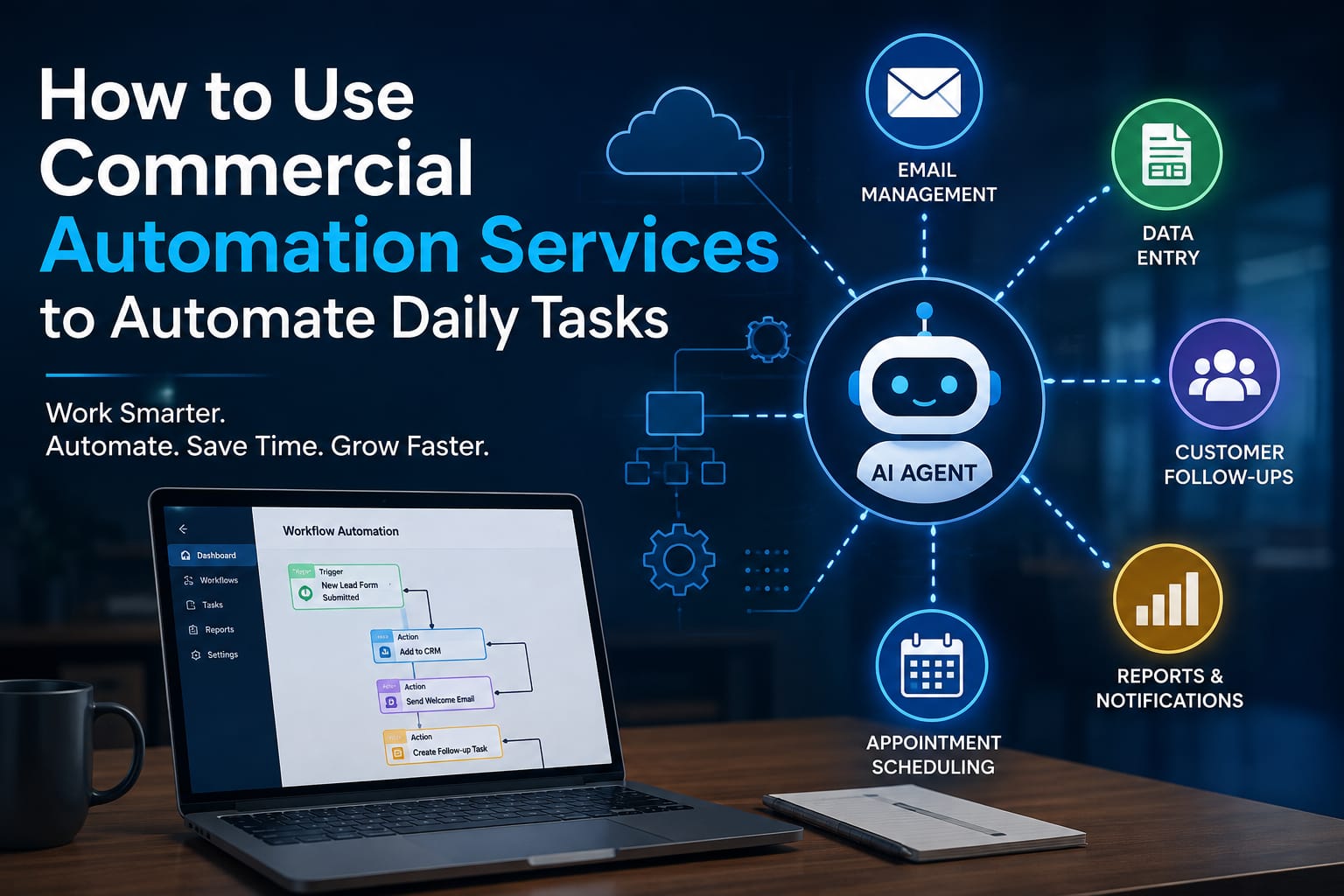
For example, when a customer submits a contact form, an automated workflow could capture the information, add the lead to a CRM, send a confirmation email, notify the sales team, and create a follow-up task.
Traditional automation generally follows predefined rules. AI-powered automation can go further by interpreting information and choosing actions based on the situation. Microsoft describes AI agents as software that can interpret inputs, reason about tasks, and use tools to take actions.
This makes automation useful for both simple processes and more complex business workflows.
How Can AI Agents Automate Daily Business Tasks?
An AI agent is designed to work toward a specific goal rather than simply responding to a single instruction. It can use business data, connected tools, and defined instructions to complete multiple steps.
For instance, imagine a customer sends a message asking about an order. An AI-powered workflow could identify the customer's request, retrieve order information from the relevant system, prepare a response, and update the support record.
Depending on the workflow and its permissions, a human can also be included for approval when a decision is sensitive or uncertain. Modern automation platforms increasingly support this human-in-the-loop approach.
That balance is important. Automation should reduce repetitive work without removing appropriate human oversight.
Daily Tasks You Can Automate
Commercial automation services can be applied to many everyday business activities.
1. Email Management
Businesses receive a constant flow of emails. Automation can sort incoming messages, identify common requests, send routine responses, and route important messages to the appropriate employee.
An AI agent can also help classify messages based on their content instead of relying only on fixed keywords.
2. Data Entry
Manually copying information between spreadsheets, forms, CRMs, and other platforms is both time-consuming and vulnerable to mistakes.
An automated workflow can transfer information between connected systems automatically. This reduces unnecessary copy-and-paste work and helps keep records consistent.
3. Customer Follow-Ups
Following up with every lead or customer can easily become difficult when a team is busy.
Automation can send scheduled follow-up messages, create reminders, update customer records, and notify employees when a personal response is needed.
The workflow can be designed around business rules, while an AI agent can help interpret customer messages and determine the next appropriate step.
4. Reports and Notifications
Regular reports often require employees to collect information from several sources before presenting it.
An automated system can gather data, organize it, generate a report, and send it to the relevant team at a scheduled time. This is especially useful for sales, marketing, finance, operations, and customer-support teams.
5. Appointment Scheduling
Scheduling can involve several back-and-forth messages. Automation can reduce this friction by connecting calendars, forms, emails, and customer information.
For example, when someone requests an appointment, the workflow can check available times, send suitable options, confirm the selected slot, and create the calendar event.
How to Choose the Right Tasks for Automation
Not every task should be automated immediately.
A good starting point is a task that is repetitive, follows a reasonably clear process, happens frequently, and does not require complex human judgment.
Ask yourself:
- Does this task happen every day or every week?
- Does it involve repetitive data entry?
- Does the process follow predictable steps?
- Does it take employees away from higher-value work?
- Can the result be checked easily?
- What happens if the automation makes a mistake?
Start with one workflow instead of trying to transform the entire business overnight. A focused pilot makes it easier to measure whether the automation is actually helping.
A Simple Process for Implementing Automation
Successful automation is more than connecting a few software tools. The workflow should be planned around a real business problem.
Step 1: Identify the Bottleneck
Look for tasks that repeatedly consume employee time. Document what happens from beginning to end.
Step 2: Define the Desired Outcome
Decide what the automation should accomplish. For example, the goal might be to move new leads into the CRM and notify a salesperson within a specific timeframe.
Step 3: Select the Right Automation Approach
Simple, predictable tasks may only need rule-based workflows. More flexible processes may benefit from AI agents that can interpret information and use multiple tools.
Step 4: Connect the Necessary Tools
Automation may involve CRMs, email platforms, calendars, databases, spreadsheets, customer-support systems, or APIs. The exact setup depends on the existing technology stack.
Step 5: Test Before Scaling
Test the workflow using realistic examples. Check successful cases as well as unusual inputs and potential errors.
AI agents can behave differently from traditional deterministic software, so testing, monitoring, and governance are particularly important. Microsoft specifically recommends planning, securing, building, and managing agents as part of an organizational adoption approach.
Step 6: Monitor and Improve
Automation is not necessarily a one-time project. Review performance, track errors, collect employee feedback, and improve the workflow when business requirements change.
What Are the Benefits of Commercial Automation Services?
When implemented properly, automation can provide several practical benefits.
Time savings: Employees spend less time on repetitive administrative work.
Faster workflows: Tasks can move between systems without waiting for someone to perform every manual step.
Fewer manual errors: Automated data transfer can reduce mistakes caused by repetitive copying and typing.
Better consistency: Standardized workflows help ensure routine processes follow the same basic rules.
Scalability: A well-designed workflow can handle increasing volumes without requiring every step to be performed manually.
More focused employees: Teams can spend more time on communication, problem-solving, strategy, and creative work.
These benefits do not come from AI alone. The real value comes from matching the right technology to the right business process.
Security and Human Oversight Matter
Automation should never be treated as a “set it and forget it” system, especially when it handles customer information, financial data, employee records, or other sensitive business information.
Businesses should define permissions carefully, protect connected accounts, monitor activity, and decide which actions require human approval. Enterprise automation platforms increasingly include access controls, logging, governance, and human review mechanisms for this reason.
An AI agent should also have a clearly defined role. Giving an automated system unlimited access to every business tool can create unnecessary risk. Good automation is controlled automation.
Commercial Automation Services vs. Doing Everything Manually
Manual work gives employees direct control, but it becomes difficult to maintain when repetitive tasks grow.
Commercial automation services provide a structured way to connect business processes and reduce unnecessary manual steps. However, automation is not automatically better simply because it uses AI. A task should be automated when doing so creates a clear benefit without introducing unnecessary complexity or risk.
For some workflows, a simple rule-based automation may be enough. For others, an AI agent can provide the flexibility needed to understand different inputs and coordinate several steps.
Conclusion
The most useful automation is not the one with the most impressive technology. It is the one that solves a real problem.
Start by identifying the daily tasks that consume time without adding much value. Then choose the simplest reliable automation approach for those tasks. As the workflow proves itself, you can gradually connect more systems and introduce AI agents where flexible decision-making is genuinely useful.
Commercial automation services can help businesses move from repetitive manual processes toward faster, more connected workflows. The key is to keep people involved where judgment matters, protect business data, and measure whether the automation is actually improving the way work gets done.